Contact sales

Sell internet your customers can count on.

With RemoteSIM™, every SIM card stays in a SIM bank at your office, on your own carrier accounts, and you manage them all from one platform. Each customer's router connects on the best carrier where it is, and moves to another when a tower or carrier fails.

Near Mesa Ranch Your customers

Latest Every router is on the best tower near it.

Reliable for your customers. Every SIM card under your control.

Routers connect on the best carrier wherever they are, and every SIM card stays in a SIM bank you manage.

01

Ship any router, anywhere.

Each router connects on the strongest carrier where it's installed, so you never match a carrier to an address before it ships. When a tower or carrier fails, it moves to another one.

Same router, same plan, three places
02

Every SIM card, managed in your building.

Your SIM cards sit in a SIM bank at your office, on your own carrier accounts. See which router is on which card, and when a customer cancels, their card is ready for the next one right away.

Your SIM bank, 100 SIM cards

Verizon
36 of 40 in use
AT&T
32 of 36 in use
T-Mobile
20 of 24 in use

In use Ready for the next router

03

A spare card for every line that goes down.

When a carrier suspends a line, shuts off an account, or a card fails, the platform flags it and the router moves to a ready card in your bank. You see what happened and where every router went.

Flagged lines this week

  • Suspended by the carrier Verizon line ending 4471 Router moved to an AT&T card
  • Card failed AT&T line ending 0932 Router moved to another AT&T card
  • Account shut off Verizon account 2, 12 lines 12 routers moved to ready cards
04

Run every line from your desk.

Set a router's preferred carrier, move it to another carrier account, or give it a specific SIM card. Texts to your lines, like carrier account PINs, show up there too. You never mail a SIM card or wait for one to come back.

Lakeview Diner, preferred carrier

Verizon AT&T T-Mobile

Online on AT&T

Set from the platform. The router moves to a card on that carrier.

Sell any plan you want, built the way you want.

Bill by the month, by the day, or both. Cap the data or speed, or sell it unlimited.

Home 100 GB $65 a month
Data
100 GB a month
Speed
Up to 200 Mbps

62 of 100 GB used Renews Dec 14

Monthly subscription

The plan most of your customers will be on. It renews every month on its own.

Day pass $12 a day
Data
Unlimited
Speed
Up to 100 Mbps

Online 4 of the last 14 days

On demand

Customers pay only for the days the router is on, by the day or by the week. A fit for cabins, RVs, events, and job sites.

Business backup $10 a month + $2 a day
Data
5 GB a day
Speed
Unlimited

Standby Online 2 days this month

Backup

A low monthly fee while the router waits on standby, plus a daily price for the days it takes over from the wired line.

Sell your lines to other providers, with billing that runs itself.

Each line they turn on or renew is charged as it happens. Bill monthly, or have them pay ahead.

Northline Wireless Home 100 GB at $55 a line
  1. Nov 1 120 lines renewed $6,600 charged
  2. Nov 9 20 lines turned on $1,100 charged
  3. Dec 1 Invoice INV-0217 created $7,700, due Dec 15
  4. Dec 12 Payment recorded, bank transfer Invoice paid

Your customers and their devices, managed together.

What you do in a customer's record happens on their router. There is no second system to update.

In the customer's record On their router
Ship an order

Scan the router's serial. It joins the customer's account and their service starts.

Pause service

Service on their router is held until you resume it.

Change their plan

The router moves to the new plan and keeps running.

Ship a replacement

Service moves to the new router when the old one comes back.

Cancel service

Service on their router stops. If they rented it, a return opens so it comes back to you.

  • Customer records

    Contact details, address, notes, orders, and tracking, from first lead to former customer.

  • Sell or rent routers

    Sell routers outright, or rent them with a deposit and take them back for repair.

  • Support from your desk

    Run a speed test, change the Wi-Fi, or reboot a customer's router.

  • Webhooks

    Send new customers, orders, and paused service to your own tools.

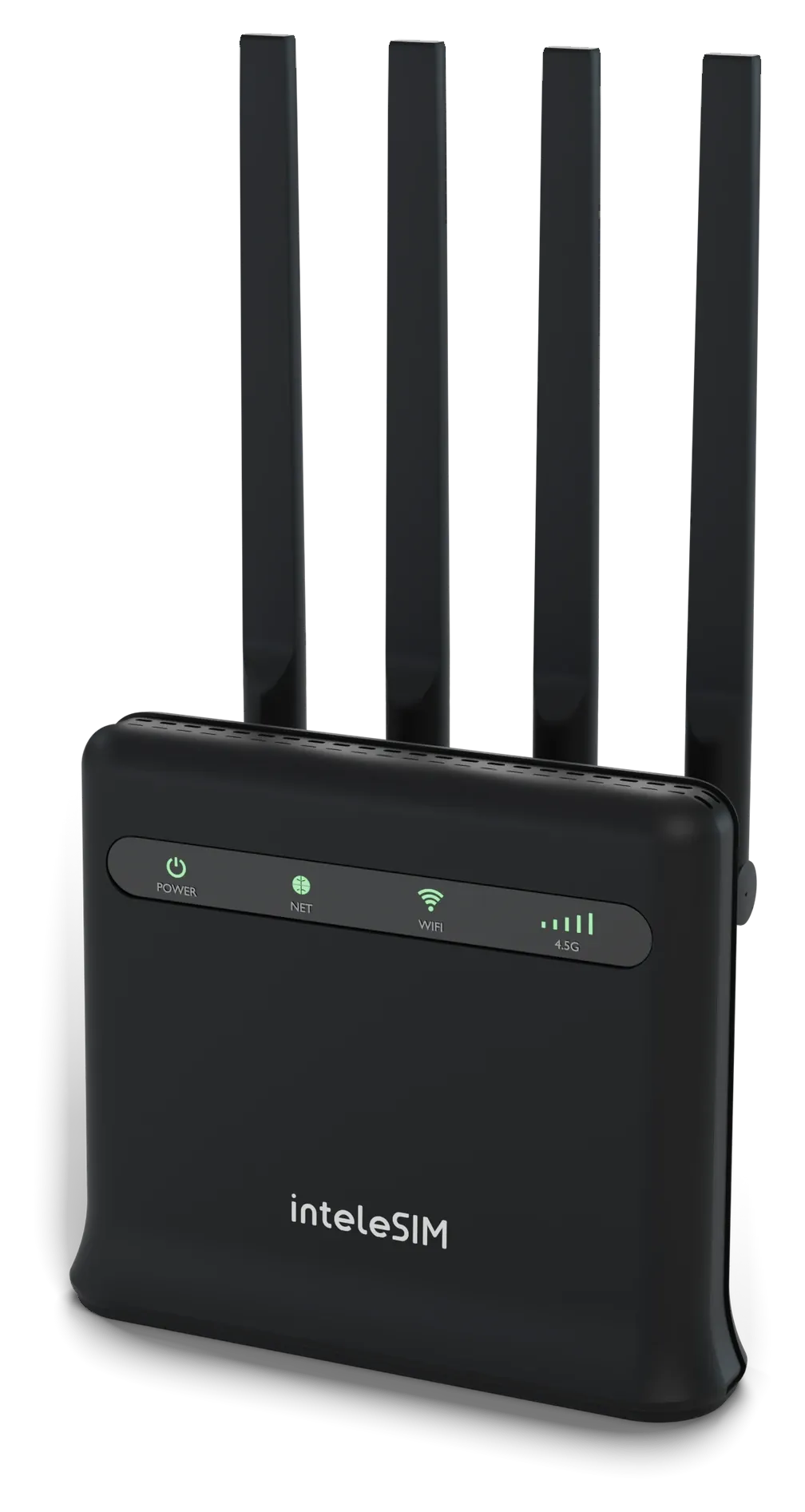
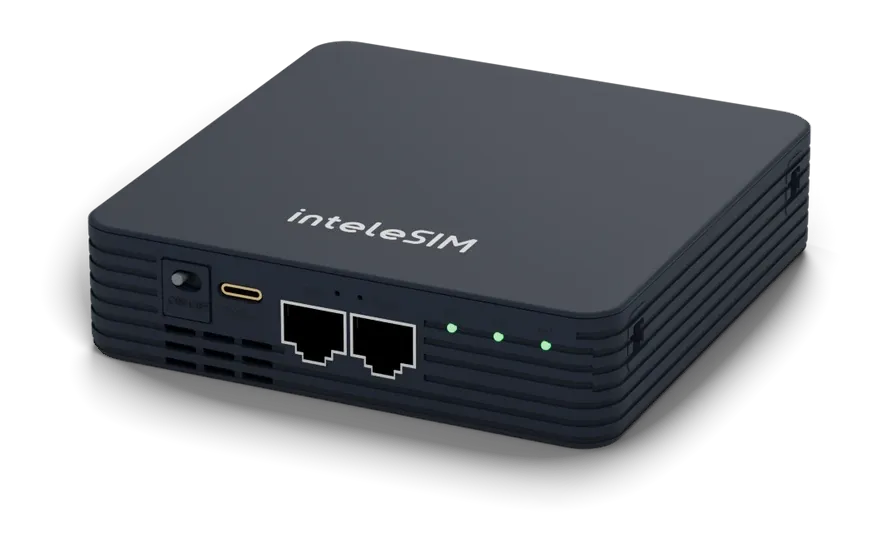
A router for every customer.

Ship the X20 anywhere power comes and goes, and the X12 to homes and businesses.

X20

For RVs, cabins, events, and job sites.

InteleSIM X20 router, with its power switch, USB-C, LAN, and WAN ports on the front
Cellular
5G and 4G LTE
Wi-Fi
Wi-Fi 6, 2.4 and 5 GHz
Ethernet
1 WAN, 1 LAN
Antennas
Internal
Power
Built-in battery, USB-C charging

X12

For homes and businesses with constant power.

InteleSIM X12 router with four external antennas
Cellular
4G LTE, Category 12
Wi-Fi
Wi-Fi 5 on 5 GHz, Wi-Fi 4 on 2.4 GHz
Ethernet
1 WAN, 3 LAN
Antennas
4 external
Power
Plug-in adapter

Sell cellular internet from your own SIM bank.

Contact us and we'll schedule a sales call and a live demo.